Factory Reset
Use a factory reset to restore default device parameters, or an application reset to restore application settings while keeping communication settings. The key difference is whether the communication interfaces are reset.
Choose the Reset Scope
Reset options: effect on settings and the corresponding SOPASair menu entries.
| Action | Effect | SOPASair menu entry |
|---|---|---|
| Factory reset | Restores default parameters, including communication settings. The current connection can be lost. | Reset to factory settings |
| Application reset | Resets application settings while retaining communication settings, such as the IP configuration. | Reset and maintain communication interfaces |
After a factory reset, the sensor IP address is 192.168.0.1
for LRS4000, multiScan100, multiScan200, and picoScan100.
An application reset keeps the current IP configuration.
Before You Reset
- Download a configuration backup and keep any required passphrase safe.
- Record the current IP configuration and check the device's default address so that you can reconnect after a factory reset.
- Ensure that resetting the configuration will not disrupt production or a safety-related process.
Perform a Reset
Device Web Interface
Log in at the Service user level. Open the three-dot menu, select Device, choose the required reset option, and confirm it. Menu labels and availability can vary with firmware.
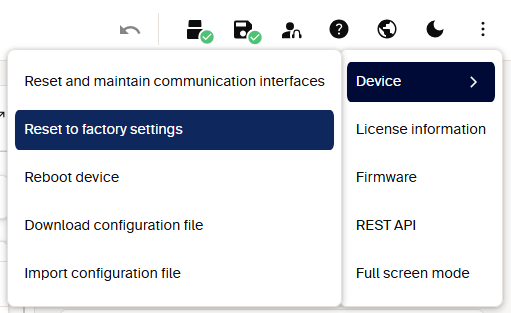
SOPASair Device menu: application reset retains communication interfaces; factory reset also restores their defaults.
REST API or CoLa A/B
Reset methods: authenticated REST calls and CoLa method telegrams.
| Action | REST method | CoLa A/B method |
|---|---|---|
| Factory reset | POST /api/LoadFactoryDefaults |
sMN mSCloadfacdef |
| Application reset | POST /api/LoadApplicationDefaults |
sMN mSCloadappdef |
Choose one method, not both in sequence. Follow the REST authentication guide and the device's REST reference for LRS4000, multiScan100, multiScan200, or picoScan120/150. For CoLa access levels and framing, see the LRS4000, multiScan100, multiScan200, or picoScan120/150 telegram listings.
A reset changes parameters, not firmware. Reboot device (SoftReset) or a
power cycle restarts the device without restoring factory defaults; unsaved
changes can be lost.