Object Evaluation
Object Evaluation combines 3D object tracking with configurable criteria. The tracker estimates each object's track ID, horizontal and vertical size, speed, direction of movement, and age. An evaluation checks those properties within a configured region and reports whether its criteria are met. This lets an application respond to relevant movement without processing every scan point on a host.
multiScan100 Object Evaluation overview: tracked objects are evaluated against configured regions and criteria.
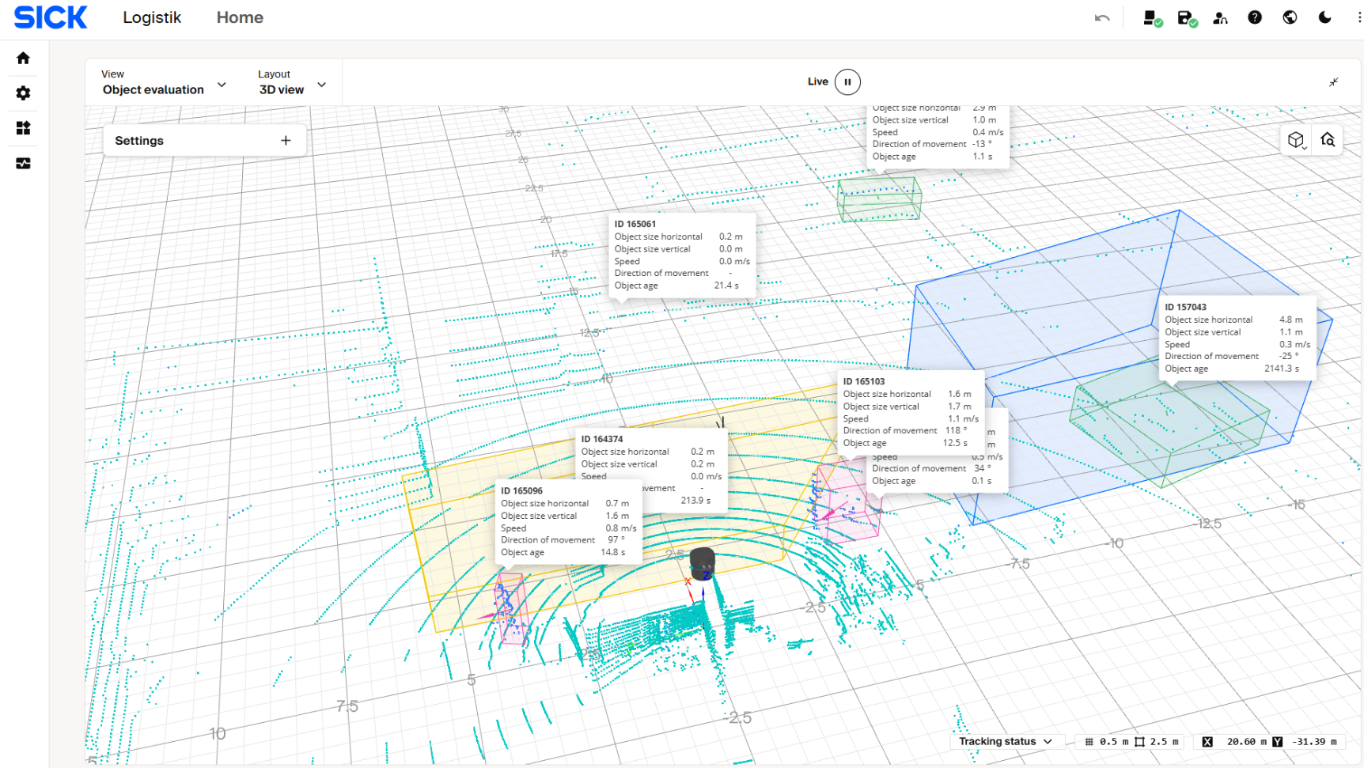
The multiScan100 3D view displays tracked-object IDs, dimensions, speed, direction of movement, and age alongside the configured evaluation regions.
Object Evaluation is available from multiScan100 firmware 2.5.0 and requires the 3D Object Detection Advanced package. Check the device variant, firmware, and installed license before commissioning. See the firmware 2.5.0 release notes and multiScan100 license list.
Object Evaluation filters tracked objects by measurable properties; it does not return semantic object-class labels. Validate any application decision against the real objects and operating conditions.
How an Evaluation Works
Object tracking estimates object properties over successive scans. An evaluation then applies its spatial region and criteria to those tracks. The result is a state for each configured evaluation, not a class label for each object.
Object Evaluation criteria: region and track properties used to determine whether an evaluation is infringed.
| Criterion | How it affects the evaluation |
|---|---|
| Region of interest | A polygon in the scan plane, with lower and upper Z limits, defines where objects are evaluated. |
| Object size | Minimum horizontal and vertical sizes can be set. An optional maximum-size filter rejects objects that exceed the configured maximum dimensions. |
| Motion state | ALL accepts moving and stationary tracks; MOVING or STATIONARY restricts the evaluation to that motion state. |
| Speed | An optional minimum and maximum speed range filters tracks. |
| Direction | An optional direction filter uses a configured direction and uncertainty range. |
| Object age | A minimum age can exclude tracks until they have been observed long enough. |
| Hidden time | A maximum hidden time controls how long a temporarily unobserved track can remain part of the evaluation. |
Use SOPASair for the displayed units and the
multiScan100 REST API reference for
numeric constraints and enum values. The REST configuration uses
EvaluationId to associate a contour and criteria with an evaluation.
Configure and Validate
- Confirm that the sensor has firmware 2.5.0 or later and the 3D Object Detection Advanced package.
- In Configuration > Basic settings, turn off interlaced mode. Object evaluation is unavailable in interlaced mode; the sensor reports error 211.
- Open the Object Evaluation application in SOPASair. Define the region of interest and choose the motion, size, speed, direction, and age criteria that match the application.
- Activate the configured evaluation group. A group can be activated or deactivated through the REST API as well as the device interface.
- Test representative objects and movements in the intended region. Confirm that qualifying tracks produce the expected result and that excluded tracks do not.
- Monitor the application, group, configuration, and evaluation states described below.
Read and Interpret Results
Use these read-only REST endpoints to check whether the application is available, the group is active, and the evaluation result matches the scene.
Object Evaluation status endpoints: REST path and returned status.
| REST endpoint | Meaning |
|---|---|
GET /api/ObjectEvaluationApplicationState |
Application state: 0 DEACTIVATED, 1 ACTIVE, 2 CONFIGURING, or 3 ERROR. |
GET /api/ObjectEvaluationGroupState |
Activation state for configured groups: 0 NOT_CONFIGURED, 1 ACTIVE, or 2 INACTIVE. |
GET /api/ObjectEvaluationResult |
Results for configured evaluations. EvaluationResultList contains one state per evaluation. |
GET /api/ObjectEvaluationConfigState |
Reports whether active beam and evaluation limits are 0 OK, 1 WARNING, or 2 EXCEEDED. |
Each state in EvaluationResultList has a distinct meaning:
Evaluation result states: numeric value and interpretation.
| Value | State | Meaning |
|---|---|---|
0 |
NOT_CONFIGURED |
No evaluation is configured for this entry. |
1 |
INACTIVE |
The evaluation is configured but not active. |
2 |
FREE |
No qualifying object infringes the evaluation. |
3 |
DETECTING_INFRINGED |
The sensor is confirming an infringement. |
4 |
INFRINGED |
A qualifying object infringes the evaluation. |
5 |
DETECTING_FREE |
The sensor is confirming that the infringement has cleared. |
Treat DETECTING_INFRINGED and DETECTING_FREE as transitional states, not
stable results. The application state, group state, configuration state, and per-evaluation
result are separate. Check the relevant status endpoints when diagnosing an
unexpected output.
Configure Through REST
The REST API provides operations to get and set each evaluation's contour and criteria, and to activate or deactivate a group. The get/set contour and configuration operations require at least the Authorized Client user level. Review the request schemas and error codes in the multiScan100 REST API reference before writing configuration.
Object Evaluation configuration operations: REST method and purpose.
| REST operation | Purpose |
|---|---|
POST /api/GetObjectEvaluationContour |
Read an evaluation's polygon and lower/upper Z limits. |
POST /api/SetObjectEvaluationContour |
Set an evaluation's polygon and lower/upper Z limits. |
POST /api/GetObjectEvaluationConfiguration |
Read an evaluation's name and criteria. |
POST /api/SetObjectEvaluationConfiguration |
Set an evaluation's name and criteria. |
POST /api/ActivateObjectEvaluationGroup |
Activate or deactivate an evaluation group. |
The Get... operations above use HTTP POST with an evaluation ID in the
request body. Do not confuse them with the read-only GET status endpoints.
After changing settings, read them back and verify the live result in SOPASair.
Configure Through CoLa
The same status variables and operations are available as CoLa telegrams, for example for a PLC. See the Object Evaluation telegrams in the multiScan100 CoLa telegram listing for the structures and copyable CoLa A and CoLa B examples.
ActivateObjectEvaluationGroup switches only groups with the activation type
Telegram. For a group with the activation type Always, the device confirms
the request, but the group stays active. Read ObjectEvaluationGroupState
to confirm the change. Changes made through CoLa or REST are lost on restart
unless you save them permanently.