Building Security Example
Security access gates form a transition between secure and non-secure areas of an airport. An object-detection check can help identify items left in the gate area before access is granted.
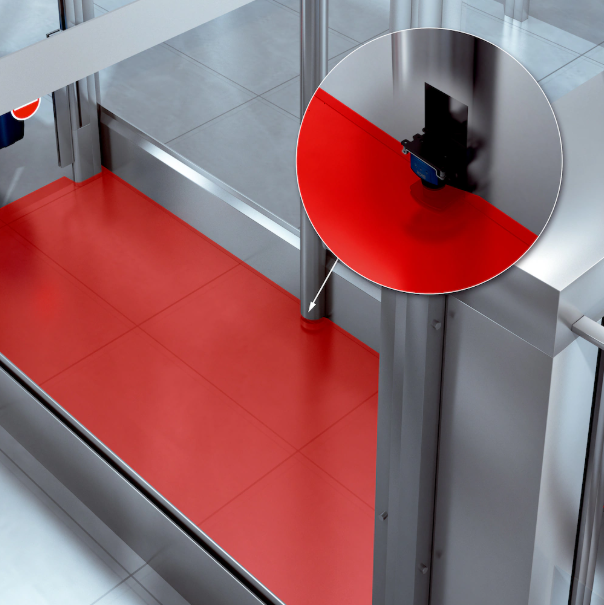
Example security-door installation. The red overlay illustrates the detection area; the inset shows the LiDAR sensor mounting position.
A compact 2D LiDAR sensor can monitor a configured detection zone and report objects that interrupt the scan or differ from a taught reference contour. This can support a security workflow concerned with prohibited items, such as weapons, but LiDAR object detection alone does not identify an object's type or determine whether it is prohibited. Validate detection coverage and performance for the installation and combine it with the required security checks.
Suggested Data Path
Configure detection zones on the sensor using field evaluation. Use teach-in to capture the surrounding geometry as a reference contour for detection. Keep the scene stable during capture, then validate the evaluation with representative objects and movement.
Example Solution
The following video demonstrates teach-in for a building-security example.
Teach-in demonstration for the building-security example.