Backup & Restore
A configuration file contains the complete device configuration. Use it to roll back to a known-good state, replace a device, or copy a validated configuration to identical sensors. Encryption with a passphrase is optional.
In the Web GUI
Open the Device menu at the top right and select Download configuration file. The same menu imports a file.
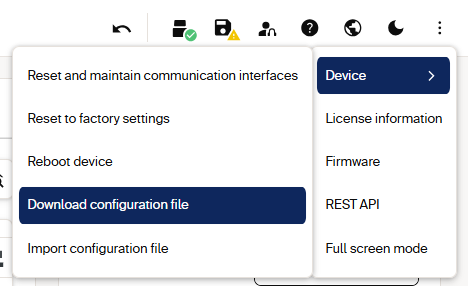
Access the configuration backup from the Device menu.
REST Endpoints
REST Endpoints: action, method and path, device families, and authentication.
| Action | Method and path | Device families | Authentication |
|---|---|---|---|
| Create a session token | POST /api/CreateSessionToken |
multiScan200, picoScan100 | Challenge-response, Service |
| Create the backup file | POST /api/CreateParameterBackup |
multiScan100, multiScan200, picoScan100 | Challenge-response, Service |
| Check the create result | GET /api/CreateParameterBackupResult |
multiScan200, picoScan100 | None |
| Download the file | GET /api/parameterbackup |
multiScan100, multiScan200, picoScan100 | X-Session-Token header where required by firmware |
| Upload a file | PUT /api/parameterbackup |
multiScan100, multiScan200, picoScan100 | X-Session-Token header where required by firmware |
| Apply the uploaded file | POST /api/RestoreParameterBackup |
multiScan100, multiScan200, picoScan100 | Challenge-response, Service |
| Check the restore result | GET /api/RestoreParameterBackupResult |
multiScan200, picoScan100 | None |
The session token protects binary transfers where the firmware exposes that
mechanism. CreateParameterBackup and RestoreParameterBackup accept an
optional Passphrase (up to 256 characters). It is independent of the login
password. A file created with a passphrase can only be restored with the same
passphrase.
Download a Configuration
- On multiScan200 and picoScan100,
POST /api/CreateSessionTokenand storedata.token. On multiScan100, follow the file-transfer authentication described by the matching OpenAPI file. POST /api/CreateParameterBackup, optionally with a passphrase. Use a new challenge for this request.- On multiScan200 and picoScan100, poll
GET /api/CreateParameterBackupResultuntildata.Statusis1(Finished), and check thatdata.Resultistrue. On multiScan100, wait for the create request to finish before downloading. -
Download the file:
The response is
HTTP 200with the binary file (about 86 KB). Without the token header, the device returnsHTTP 403.
Restore a Configuration
- On multiScan200 and picoScan100,
POST /api/CreateSessionTokenand storedata.token. On multiScan100, follow the file-transfer authentication described by the matching OpenAPI file. -
Upload the file:
-
POST /api/RestoreParameterBackupwith a fresh challenge and the same passphrase that was used to create the file. - On multiScan200 and picoScan100, poll
GET /api/RestoreParameterBackupResultuntil the restore is finished, and check the result. - Persist the result with
POST /api/WriteEeprom, then confirm the checksums and key parameters.
Error Handling
Error Handling: symptom, cause, and fix.
| Symptom | Cause | Fix |
|---|---|---|
HTTP 403 on GET/PUT parameterbackup |
Missing or expired session token | Create a new token; send the X-Session-Token header |
| Download returns an empty or partial file | File read before creation finished | Poll CreateParameterBackupResult before downloading |
| Restore rejected | Wrong passphrase, or a file from a different device type | Use the same passphrase; restore only onto a matching device type |
header.status 4 or 10 on Create* or Restore* |
Wrong password, user level not enabled, or the challenge was invalidated | Fetch a new challenge per request; use Service |
Roll Out a Configuration to Many Sensors
Configure and validate one "golden" device, download its configuration file, and restore it on every identical sensor. This also transfers field evaluation groups, which you can then modify over REST. Use the LFTchecksum to confirm that a restore changed only what you expected. Firmware Update uses the same session-token pattern.
Related Articles
How to create a device configuration offline and import it.
How to import and export configuration with SOPAS ET.