Backup & restore
The configuration file feature archives a complete device configuration as a single file. It can be used interactively in the device GUI or headlessly through the REST API. Encryption is optional. Use it to clone a configuration across identical sensors, roll back to a known-good state, or exchange configurations between devices.
In the device GUI, open Device and select Download configuration file to access the backup.
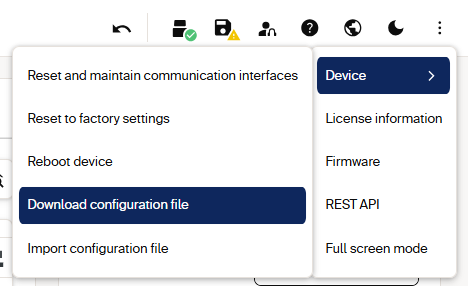
Access the configuration backup from the Device menu.
The raw file endpoints require a session token in the X-Session-Token header: this prevents cross-site request forgery on the binary transfer.
Endpoints
| Action | Method / URL | Auth |
|---|---|---|
| Create a session token | POST /api/CreateSessionToken |
Challenge-response (or Basic Auth on some firmware) |
| Trigger backup creation (async) | POST /api/CreateParameterBackup |
Challenge-response |
| Download the file | GET /api/parameterbackup |
Session token |
| Upload a file | PUT /api/parameterbackup |
Session token |
| Apply an uploaded file (async) | POST /api/RestoreParameterBackup |
Challenge-response |
The CreateParameterBackup / RestoreParameterBackup payloads can carry a passphrase to encrypt the file:
The passphrase is independent of the login password. If encryption is enabled, supply the same passphrase when restoring.
Download a configuration
CreateParameterBackup and RestoreParameterBackup are fire-and-return: the HTTP response only confirms the request was accepted; the work happens on the device afterwards. Wait at least 1 second before the next step.
- Get a session token:
POST /api/CreateSessionTokenat Service level; storedata.token. - Trigger creation:
POST /api/CreateParameterBackup, optionally with a passphrase. Fetch a fresh challenge for this call (the previous nonce is consumed). - Wait around 1 second for the device to finish generating the file.
- Download:
GET /api/parameterbackupwith the token header. This returns the binary file (~86 KB). Without the header, you get HTTP 403.
1. Create a session token
The response contains the session token:
2. Trigger backup creation
Fetch a fresh challenge for this asynchronous request:
3. Download the backup
Wait approximately 1 second, then download the binary backup file:
The response is HTTP 200 with the binary backup file.
Import (restore) a configuration
- Get a session token (as above).
-
Upload the file with
PUT /api/parameterbackup, the token header and the binary body: -
Activate the restored parameters (challenge-response), supplying the same passphrase:
-
Wait around 1 second, then optionally persist:
The device reboots to apply a full restore. Confirm afterwards that the checksums and key parameters match your expectation.
Pseudocode
Download
Create a session token:
Trigger the asynchronous backup:
Wait approximately 1 second, then download and save the response:
Import
Upload the backup file:
PUT /api/parameterbackup HTTP/1.1
X-Session-Token: <token>
Content-Type: application/octet-stream

<binary backup file>
Apply the uploaded parameters, then persist them:
Error handling
| Symptom | Cause | Fix |
|---|---|---|
HTTP 403 on GET/PUT parameterbackup |
Missing or expired session token | Create a fresh token; add the X-Session-Token header |
| Download returns an empty/partial file | Read before the async create finished | Wait ≥ 1 s (or poll) after CreateParameterBackup |
| Restore rejected | Wrong passphrase, or a backup from a different device type | Use the same passphrase; restore only onto a matching model |
401 on Create*/Restore* |
Stale nonce or user level not enabled | Fetch a new challenge per request; enable the user level |
A backup restored onto many identical sensors is the fastest way to roll out a validated configuration, including the field evaluation groups that can only be created via the UI or a restore, then modified over REST. Snapshot a golden device, then push its backup to the fleet.
Firmware update Session-token pattern; Integrity & checksums confirms a restore changed only what you expected.