Getting Started with the IO-Link Connectivity Starter Kit
You are now ready to get started with the IO-Link Connectivity Starter Kit.
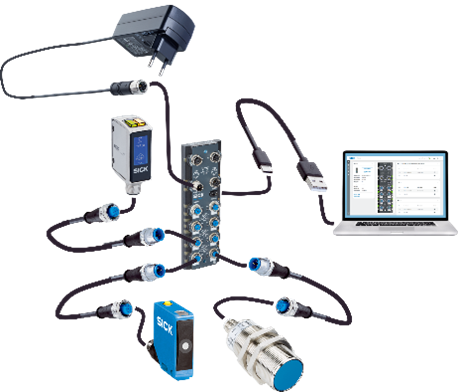
Follow the instructions below to connect the SIG300 and the included IO-Link sensors. You can also watch the tutorial video for additional information about the network device, its ports and the Logic Editor.
Setup Sensors
- Connect the SIG300 using the USB-C cable and the power supply.
- Choose the correct plug adapter and connect the power supply to an outlet.
- Connect the USB-C cable to the computer.
- Open a browser and enter the default IP address:
- Connect the W10, UC12 and IMC30 sensors to the SIG300 using the IO-Link cables, for example to ports S1 to S3.
- The devices are now ready to use.
- If the optional Mounting Kit is available, mount the sensors on the assembled frame using the corresponding mounting brackets.
Optional Mounting Frame
The mounting frame is only included when using the separate Mounting Kit.
Use the shared Mounting Frame Setup page for the complete assembly instructions:
Tutorial
The following tutorial provides additional information about the network device, its ports and the Logic Editor.
Troubleshooting
Connection and Setup Problems
The SIG300 user interface does not open
Make sure that the computer is disconnected from any active VPN connection, as this may block access to the network device.
Open the default IP address again:
The Ready LED is not green
Check whether the power supply and the USB-C cable are connected correctly.
Wait up to two minutes for the SIG300 to complete its startup process.
The SIG300 still cannot be reached
Use SICK AppManager to identify the current device IP address.
Open SICK AppManager product page
Additional information about SICK AppManager can be found on the Advanced Topics page:
Additional support is required
Check the IO-Link Starter Kit FAQ for further troubleshooting information:
If the device still has issues, open the SICK Support Portal, register and create a support case.
Operating Instructions
Additional product information, operating instructions and downloads are available on the corresponding product pages:
Summary
The SIG300 is now connected to the computer and the W10, UC12 and IMC30 sensors are connected through IO-Link.
If the optional Mounting Kit is available, the sensors can also be mounted on the assembled frame.
Next Steps
You can now continue with an example project, explore the code examples or open the available training material.