Troubleshoot
Resetting the sensor
In Nova, you can click the three dots in the top-right corner to reset the application or access the file explorer for deleting files.
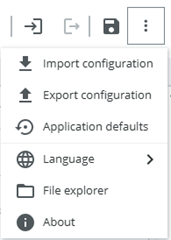
Click Application defaults to reset all the settings and jobs that were created.
To delete all the images created during an educational training session, head to Nova's file explorer, right-click the /public/Nova folder and click Delete.
The internal memory is quite limited with less than one gigabyte, so it’s recommended to clear all data after each training session. Participants can perform this cleanup themselves, either before or after the lesson.