Exercises
Exercise 2 - Classification
Exercise 2.1 - My first AI Classification
Goal: Differentiate between various objects using AI Classification
Recommended objects
| info | image |
|---|---|
| For this exercise, we recommend using various types of wrapped candy or peppermints. You can substitute these with other objects that differ significantly in appearance. Advanced Option: To increase the difficulty, choose objects that look more similar. For example, use coins and classify them by value or country of origin. You may also decide whether to include the coin backsides as part of the classification. | 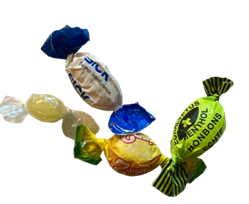 |
Choose 2 to 5 different objects for classification.
Then, in the left panel, navigate to Analysis → Add Tool → Classify → AI Classification.
Once selected, make sure your live image is set to stop  .
.
Now you can resize and move the tool’s working area as needed.
In the AI Classification settings panel, you can rename  , delete
  and add new classes.

- Create classes as needed and name the classes accordingly.
-
Click Free running
 in the bottom of the live view panel to update the image quickly.
Then in the AI Classification panel just click to add sample images for the respective classes.
 Tip
If the last thing you did was click on
, the space bar on your keyboard will also add the image to your sample pool.Once you have collected at least 5 images per class, scroll down and click
 .
.
The process will take up to about 1 minute and a neural network will be trained with the images you collected. -
Put the objects in the tray and check the results.
-
What are your findings? How did you position the objects? What did you pay attention to?
-
You can always add more images and retrain the AI.
Tip
When confronted with a wrong result use this very image as an example for the correct class. Can you get better results after retraining?
-
What happens if you don’t put anything in the tray? Fix the problem and discuss.
Do not exceed 100 images in total for this exercise. This is the local storage limit for images on the sensor.
Exercise 2.2 - Something more complicated
Expand your approach: Use other objects you have available – objects that may be more difficult to classify. You don’t need to stick to one object per class. For example:
- Object variants within a class: Wrapped candies vs. empty wrappers.
- Creative options: Drawings placed under the sensor for classification. Challenge yourself to think beyond the obvious!
- Come up with an object that might be more challenging to classify correctly.
- Collect images, start the training and test out the results. Check the tool help “?” to get more information about the training settings and try to improve your results
- Discuss with other groups what your findings are. What were you trying to classify? Do you need more images to train? If you are doing quality control, do you really need all these classes? Could another tool be more helpful in your scenario?