Troubleshoot
Image downloads are blocked
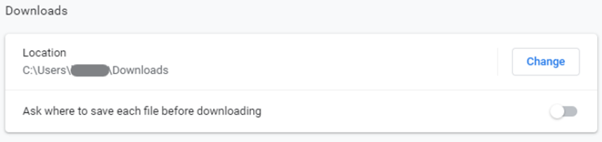
If you are unable to download images, ensure you are using the latest version of Google Chrome. Usually, when initiating a download, Chrome displays a pop-up near the options menu (three dots in the upper-right corner). Confirm this prompt to allow downloads. You may also need to set a default download path:
- Click the options menu (three vertically stacked dots) and select Settings.
- Expand the Advanced tab on the left and click Downloads.
- In the center of the window, set your default download path and ensure Ask where to save each file before downloading is unchecked.